7 Gadget Gifts for Grandparents They'll Actually Use (2026)
Seven gadget gifts for grandparents, from photo backup to a night light, a wall heater and translation earbuds. Each pick shows who it suits, its limits, and what to check first.
Our picks
- ThePhotoStick MobileGrandparents with a phone full of grandkid photos and no backup
- GuideLightGrandparents who walk a dark hallway or bathroom route at night
- Omni DataSafeGrandparents who keep wills, bills and account details on paper or scattered
 Nova LuxGrandparents who are always cold and want to adjust heat from a chair
 Synoshi PROGrandparents who still do their own bathroom and kitchen cleaning
- SealProGrandparents who cook, save leftovers or buy in bulk
- Talky AI BudsGrandparents who travel or have family who speak another language
How this list was made
The most common mistake is buying a gadget the giver would love instead of one the grandparent will reach for on an ordinary Tuesday. A clever device that needs a long setup, a new account or a new habit often ends up in a drawer. Start with what your grandparent already does each day, then pick something that fits into it. This list was put together from each brand's official product page, and those pages are the only source used. We did not buy, hold or test any of these products. Read the points below as what the brands state, plus the limits that follow from what each item is.
Top pick
1. ThePhotoStick Mobile
Best for: Grandparents with a phone full of grandkid photos and no backup
Phones fill up, and a grandparent with years of family photos often hits a storage full message at the worst moment. ThePhotoStick Mobile is a small drive that plugs into the phone. Install the free app, plug in the stick and tap Backup Now. The brand says the 256GB size holds up to 120,000 photos and videos, though the page itself notes the count varies with file size. The stick also plugs into a Windows or Mac computer, so the copies can be moved off it later.
It comes in separate iPhone and Android versions. Android phones must be OTG compatible, and a free adapter covers Micro-USB and USB-C. iPhones and iPads need a Lightning port. Check the phone before you order.
Why it made the list
- One tap on Backup Now once the free app is installed
- Plugs into a computer to move files off the stick
- Adapter included for Micro-USB and USB-C Android phones
Worth knowing
- Needs a phone with a compatible port: Lightning on iPhone, OTG on Android
- Capacity drops with larger files such as RAW photos and movie files
- iPhone and Android use different versions, so the phone must be checked first
Number 2
2. GuideLight
Best for: Grandparents who walk a dark hallway or bathroom route at night
Night trips down a dark hallway are the reason this one exists. GuideLight replaces a standard outlet cover with one that has LEDs built in, so there are no batteries, no bulbs and no wires. Turn off the power, remove the old cover and snap the new one into place. The lights come on automatically at night, and both outlets stay free for plugs, which a plug-in night light would not allow.
The brand says the LEDs last up to 25 years, a claim you cannot check before buying. The light is a soft glow, which suits a walking route more than reading. Because it sits on a wall plate, it lights only where an outlet already is and cannot be carried to another room.
Why it made the list
- Snaps over an existing outlet cover in seconds
- No batteries or bulbs to replace
- Turns on automatically at night
- Both outlets stay free for plugs
Worth knowing
- Installation means switching off power and swapping a wall plate
- Lights only where an outlet already sits
- Does one job: a night light, nothing more
Number 3
3. Omni DataSafe
Best for: Grandparents who keep wills, bills and account details on paper or scattered
Plenty of grandparents keep a will, bills and account details in a shoebox. Omni DataSafe is a USB drive with its own keypad. The brand says files stay unreadable until the PIN is typed on the drive itself, and it names AES-256 encryption. You drag files onto the drive, and the data locks when the drive is removed.
Built-in software offers bill tracking, asset management, estate planning and password management. It works with Mac, Windows and Linux computers. The founder, a retiree, built it to hold his own will and financial papers, so the idea comes from the same stage of life as the person you are shopping for. The page lists only computers, so it is not a match for someone who uses just a phone or tablet.
Why it made the list
- Files unlock only with a PIN typed on the drive
- Works with Mac, Windows and Linux
- Included software covers bill tracking and estate planning
Worth knowing
- Listed compatibility covers computers only, not phones or tablets
- The PIN must be remembered or stored somewhere safe
- Keeps private files locked away and does little else
Number 4
4. Nova Lux
Best for: Grandparents who are always cold and want to adjust heat from a chair
For the grandparent who is always a little cold, Nova Lux is a compact ceramic heater. It hangs on the wall or sits on a shelf, dresser or tabletop, and it plugs into a standard outlet, so no electrician is needed. A wireless remote comes in the box, so the temperature can be changed from the armchair, and there is a touchscreen on the unit as well.
The brand says it warms a room in 5 minutes and covers up to 549 sq ft. It weighs 2.7 lb, measures 19.3 × 7.9 × 4.5 in and draws 400 to 800W. Mounted high, the heater and cord sit out of reach of grandkids and pets, according to the brand. It also has an auto shut-off for overheating. It warms one room, not the house, and it needs a spot near an outlet.
Why it made the list
- Wireless remote changes the temperature from a chair
- Wall mount keeps the floor clear
- Light at 2.7 lb, so it moves to another room easily
- Plugs into a standard outlet with no installation
Worth knowing
- Warms one room at a time, not the whole house
- Needs to sit within reach of an outlet
- Useful mostly in the cold months
Number 5
5. Synoshi PRO
Best for: Grandparents who still do their own bathroom and kitchen cleaning
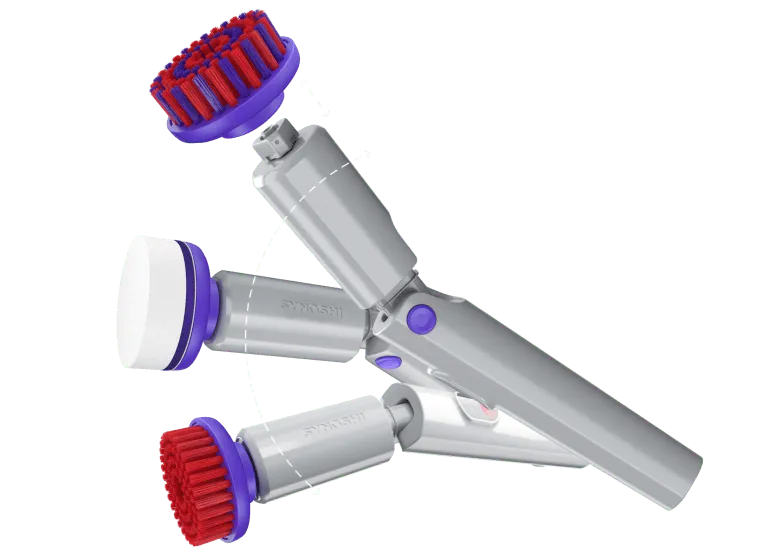
Scrubbing a tub by hand is tiring at any age. Synoshi PRO is a cordless spin scrubber, so the motor turns the brush and the user mostly guides it. The head tilts to 3 angles for reaching under furniture and around fixtures, and heads swap quickly between jobs. It is IPX5 waterproof, and it charges over USB-C, the same kind of cable many phones use.
The brand says the battery runs up to 2 hours per charge. An extended handle attachment is said to let you clean without bending or stretching, which is useful if the floor is a long way down. The page shows use on stainless steel, ceramic and soft surfaces. It is sold online only through the brand's page, and it is a cleaning tool and nothing else, so it makes little sense for someone who has help with chores.
Why it made the list
- Motor spins the brush so the user only guides it
- Tilting head reaches under and around fixtures
- Charges over USB-C like many phones
- Heads swap quickly for different surfaces
Worth knowing
- Battery runs up to 2 hours, so it needs regular charging
- Sold online only, so it cannot be picked up in a store
- A single-purpose cleaning tool with no use outside chores
Number 6
6. SealPro
Best for: Grandparents who cook, save leftovers or buy in bulk
Half-used packs of cheese and leftover soup are everyday sights in a grandparent's kitchen. SealPro is a handheld vacuum sealer about the size of a pepper grinder. Put food in a reusable bag, press the button and it pulls the air out. The brand says it seals in about 5 seconds and that one charge lasts up to 1,000 seals.
It charges over a USB cable, which is included, and it works with both bags and vacuum containers. The bags are dishwasher safe and microwave safe, so leftovers can be reheated right in the bag. Unlike a countertop sealer, it fits in a drawer. It only helps someone who cooks or saves leftovers, and it has to be kept charged.
Why it made the list
- Cordless and pepper grinder sized, so it fits in a drawer
- One button press after the food is in the bag
- Reusable bags go in the dishwasher and microwave
- USB charging cable comes in the box
Worth knowing
- Needs charging by USB cable between uses
- Only useful for someone who cooks or saves leftovers
- Sealing needs a compatible bag or vacuum container
Number 7
7. Talky AI Buds
Best for: Grandparents who travel or have family who speak another language
Talky AI Buds are earbuds that translate speech, which suits a grandparent who travels or has relatives who speak another language. They pair over Bluetooth with a free app, and the page says no account or tech skills are needed. The brand says they translate in real time across 144+ languages.
Four modes cover different situations. Free Talk has each person wear one earbud. Touch Mode is tap to talk. Speaker Mode plays the translation from the phone. Listening Mode translates nearby speech. The buds also work as regular earbuds for music and calls. The charging case brings total run time to up to 18 hours, though a single charge in the buds lasts a shorter time. They need a smartphone or tablet with the app, and earbuds are not for everyone.
Why it made the list
- Covers 144+ languages through a free app
- Four modes handle shared earbuds, tapping or speaker playback
- Doubles as regular earbuds for music and calls
- Charging case extends total run time to up to 18 hours
Worth knowing
- Needs a phone or tablet with the app to work
- The buds alone run shorter than the case total
- Worn in the ear, which some people dislike
Gadget Gifts for Grandparents: what to look for
Daily habits. Pick the gift that fits something your grandparent already does. A night light suits someone who gets up in the dark. A sealer suits someone who cooks and saves leftovers. A scrubber suits someone who still cleans the bathroom. A gadget rarely creates a habit that is not there.
Phone or no phone. Several picks lean on a device. ThePhotoStick Mobile needs a phone with the right port, Talky AI Buds need a phone and an app, and Omni DataSafe needs a computer. GuideLight, Nova Lux, SealPro and Synoshi PRO need no app. If your grandparent dislikes new apps, lean toward that second group.
Space and setup. GuideLight needs the power switched off while a wall plate is swapped, and Nova Lux needs an outlet nearby and a place to mount or rest it. SealPro and Synoshi PRO need a charging habit. Offer to do the setup on your next visit, and think about where the gift will live before you order.
What they already own. Check the phone model, the rooms and the kitchen drawers first. A second heater or sealer is rarely welcome, while a backup stick or a hallway light fills a gap. Read each brand's page and manual for details we could not cover here.
Questions and answers
What is a good gadget gift for a grandparent who has everything?
Choose something that fixes a small daily annoyance rather than another item to display. A hallway light, a photo backup stick for a full phone or a handheld sealer for leftovers all fit that idea. Check what they already own first so you do not double up.
How do I pick a tech gift for a grandparent who dislikes technology?
Choose a gift with one job and few steps. GuideLight, Nova Lux, SealPro and Synoshi PRO work without an app. Phone based picks like ThePhotoStick Mobile or Talky AI Buds work best if you offer to set them up and show the first use.
When should I order a gift for grandparents?
Order early enough to leave time for delivery and for setup, especially for gifts that need an app, a charge or a wall install. Shipping details differ by brand, so read the product page before you order and plan a visit to set it up.
What should I check before giving a phone accessory like a photo backup stick?
Check the phone model and its port first. For ThePhotoStick Mobile, the page lists Lightning for iPhones and iPads, and OTG compatibility for Android phones. There are separate iPhone and Android versions, so confirm which one your grandparent needs before buying.
Should I set up a gadget before giving it?
Yes, when it involves an app, a PIN or a charge. Install the app, charge the battery and set the PIN together if you can. Leave a short note in large print with the first steps, and keep the manual close to where the gadget will be used.
More lists
All lists
7 Gadget Gifts Dad Will Actually Use (2026)
A set of gadget gifts for dads who fix, drive, cook, travel or keep the family paperwork. Each pick is matched to a habit, with honest limits, based on official brand pages.
Top 5 Best Gifts for Coffee Lovers (2026)
Coffee gifts compared by how the recipient actually drinks: a milk frother, a burr grinder, a travel mug, a desk mug warmer and a pour over maker. Pick by routine, not by wish.
Top 5 Best Gifts for Dad (2026)
Five gift ideas for dad, from a heat and cold massage gun to a solar bird feeder with a camera. Each pick suits a different routine, so you can match the gift to what he already does.